

Chaque appel passé dans Vitecall, en session ou au clavier, arrive dans l'Historique avec son résultat, sa durée et son enregistrement. Les noms, emails et numéros visibles sur les captures sont fictifs.
Step 1: choose the period
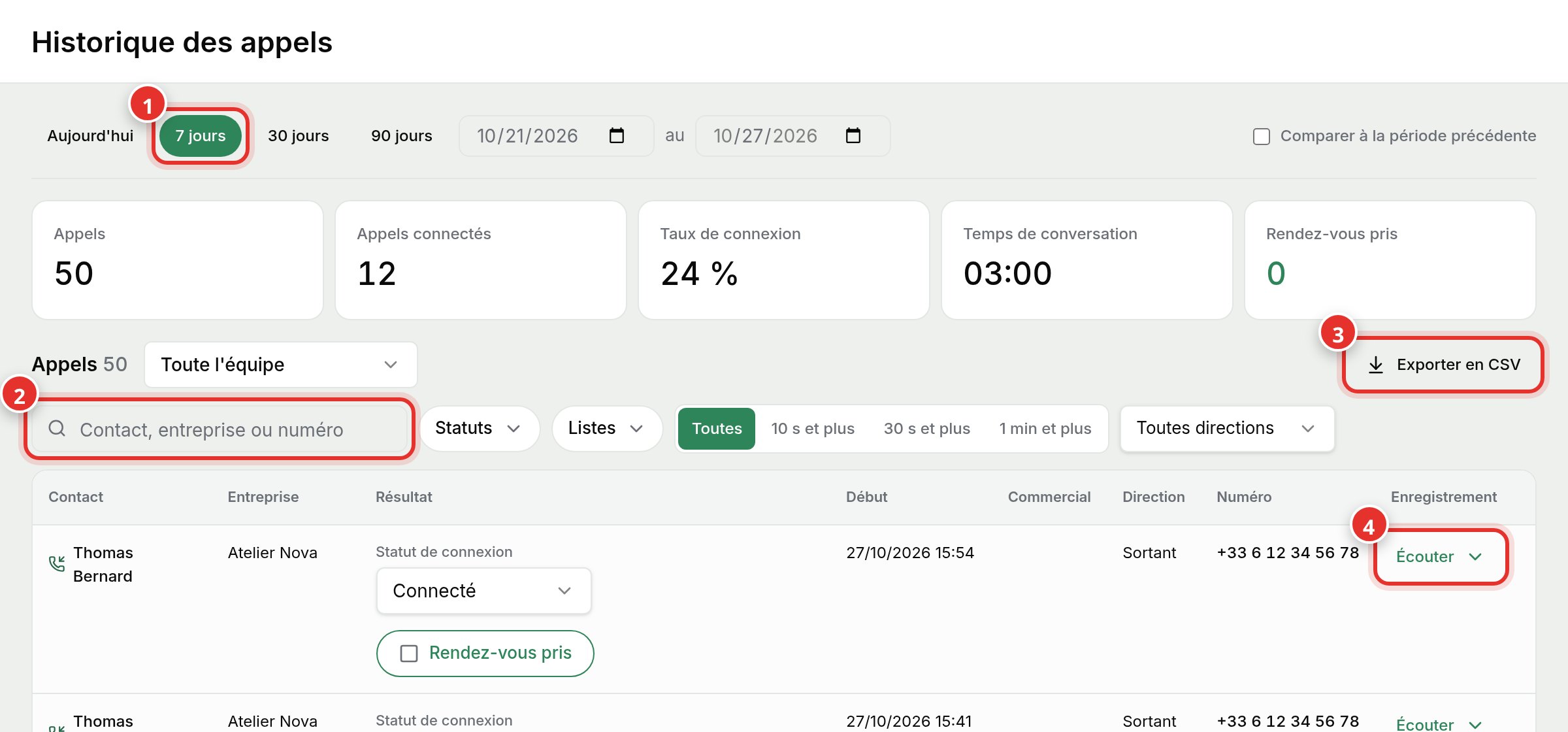
In the left menu, click History. Choose Today, 7 days (1), 30 days, 90 days, or a specific date range. The top counters update: calls, connected calls, connection rate, talk time, and appointments booked.
Step 2: find a call
Type a name, company, or number in the search bar (2). You can also filter by status, list, duration (10s+, 30s+, 1min+), or direction.
Step 3: edit outcome and replay
- The connection status can be edited directly in the row: Connected, Busy, Voicemail...
- The Appointment Booked checkbox is checked independently of the status.
- Listen (4) opens the recording and transcript if the call was recorded.
Export to CSV (3) downloads calls for the selected period and filters for spreadsheets or reporting.