« Rappelez-moi jeudi » : la page Tâches évite d'oublier ces promesses. Les noms, emails et numéros visibles sur les captures sont fictifs.
Step 1: see what is pending
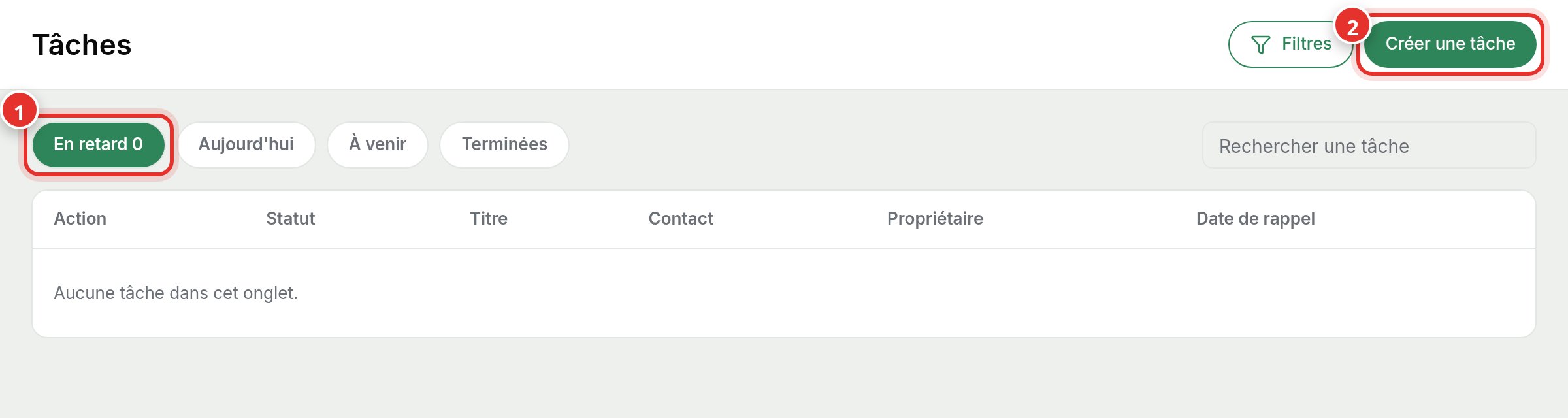
In the menu, open Tasks. Overdue (1), Today, Upcoming, and Completed tabs organize your follow-ups. The Overdue tab counter shows how many reminders are past their date.
Step 2: create a task
Click Create a task (2). Enter a title, select the contact, and choose a reminder date. The task appears in the relevant date tab and on the contact's record.
Open tasks also inform call preparation: when you call back a contact, you see what was planned.