
Vos collègues rejoignent votre équipe avec un code. Vous gardez la main sur leur rôle et les listes qu'ils peuvent appeler. Les noms, emails et numéros visibles sur les captures sont fictifs.
Step 1: Copy invitation code
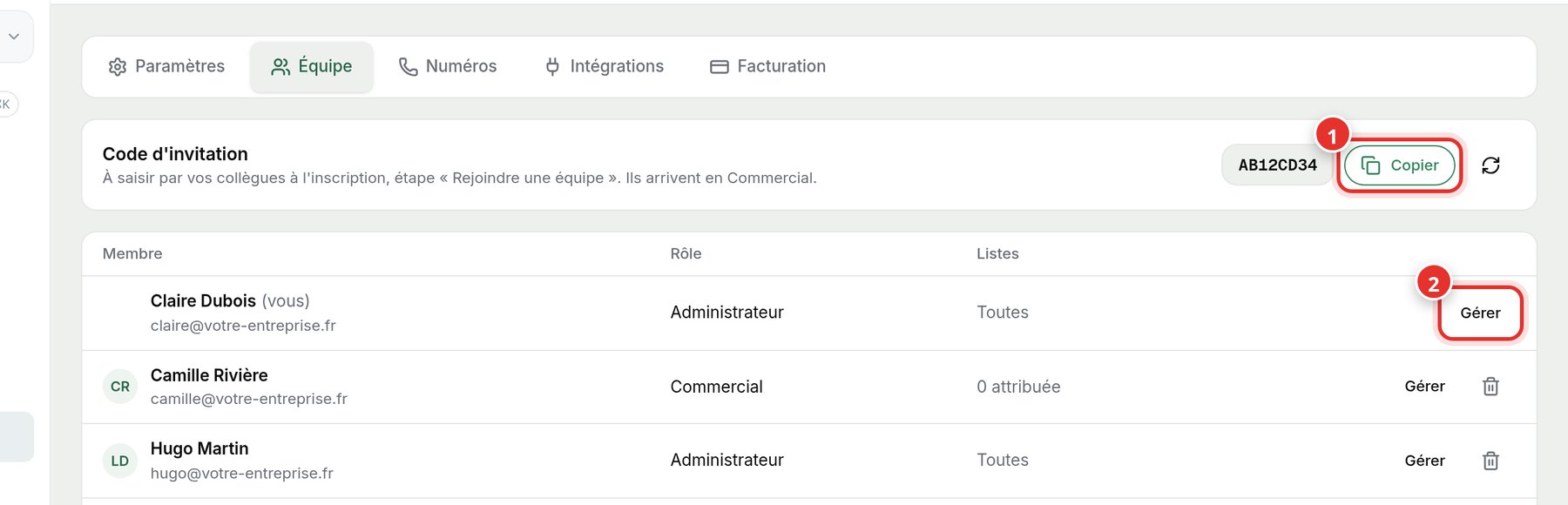
Open Settings, Team tab. Click Copy (1) next to the invitation code and send it to your colleagues. Upon registration, they select Join a team and paste this code. They join with the Sales role.
Step 2: Manage roles and lists
On a member's row, click Manage (2) to change their role or select the call lists assigned to them. The trash icon removes them from the team.
The button to the right of the code creates a new one: the old one will no longer work. Useful if the code has been widely circulated.