Ces réglages se trouvent dans Configuration, onglet Paramètres. Ils s'appliquent à vos prochains appels. Les noms, emails et numéros visibles sur les captures sont fictifs.
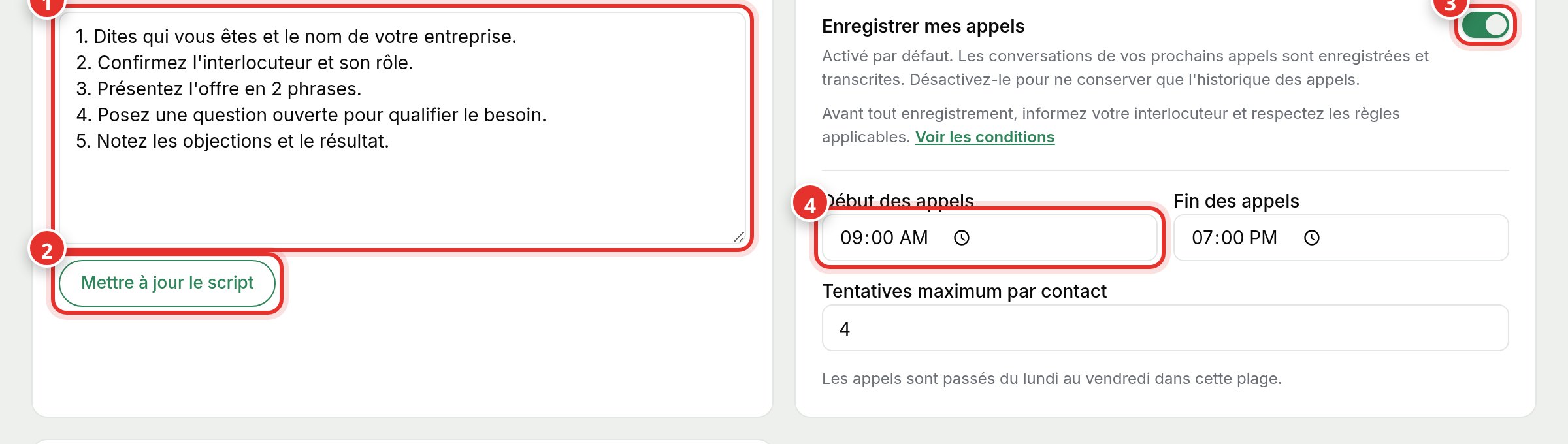
Default script
Type the steps you want to see during calls into the box (1), then click Update Script (2). It will be displayed during your call sessions.
The recording
Record my calls (3) is active by default: conversations are recorded and transcribed. Disable it to keep only history. Inform your contact before recording and comply with applicable regulations.
Hours and attempts
- Call Start and End (4) set the daily window, Monday to Friday.
- Maximum attempts per contact limits how many times the same contact is called.